Skip to content

Offline mode

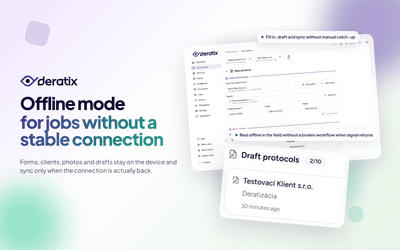
No internet? No problem. Fill in the protocol without signal and it will be sent automatically once you're back online.

Deratix Offline mode — desktop application screenshot showing the feature in action
Deratix Offline mode — mobile app view with touch-optimized interface

Features

Complete protocol without internet

Fill in and sign without signal, sending and PDF generation happen automatically when connected

Codebooks available offline

Client lists, materials, pests and device types stored on the device, technician selects from the menu

Photos without connection

Saved on the device and uploaded automatically after connection, no action needed

Continuous auto-save

Your in-progress protocol is exactly where you left it

Saved drafts

Stored directly on the device, available even after an app or phone restart

Automatic synchronization

Protocols are sent after connection with automatic retry on failure

Smart connectivity detection

Distinguishes real internet from Wi-Fi without internet, syncs only when it actually works

Codebook updates

Latest data is downloaded automatically on reconnection, technician always works with current records

Native mobile experience

Install to phone home screen with its own icon and full offline access, like a native app

Real-world examples

Fill in the whole protocol — from client to signature — even without signal

Basements, underground storage, rural sites — a typical workplace for a pest control technician. The form works exactly the same without a connection. Select the client, address, fill in all details, take photos, collect signatures. The entire protocol is saved on the device and sent automatically when you connect to the internet. No need to check anything or send manually.

Drafts are never lost

A phone call interrupts the technician, they need to move the car, or the battery dies. The in-progress protocol stays saved on the device exactly as they left it. When they reopen the app they continue where they left off. Drafts survive a phone restart, the app being closed and a battery outage. Continuous auto-save runs non-stop, so just start filling in and don't worry about saving.

Everything syncs on its own when you reconnect

The technician gets back to the car, connects to a hotspot or walks into a building with signal. The app detects the connection, confirms it actually works — not just Wi-Fi with no internet — and synchronizes all pending protocols and photos. If the upload fails, it tries again automatically. You can see the sync status directly in the app. After successful upload the protocols appear in the list and are accessible to the whole team.

Codebooks and clients are on the device — technician selects from a menu even offline

On first connection all data needed for field work is saved to the device — client list with addresses, materials, pests, device types, recommendations. The technician selects from the same menu as when online. Each time they connect, data is automatically updated — if someone at the office adds a new client or material, the change appears at the next connection. The technician always works with current records.

App on the phone home screen — with its own icon and offline access

After adding to the home screen the app opens in its own window, with its own icon and without a browser address bar. Offline mode ensures the form, codebooks and saved data are available without signal. Synchronization and PDF generation happen when connected.


Blog

Protocol planning with Google Calendar for the whole service team
New features
v0.62.0

Protocol planning with Google Calendar for the whole service team

The protocol calendar connects the visit plan, a prepared protocol for the technician, and optional synchronization with Google Calendar. The office plans work in Deratix while the technician also sees their day in the calendar they normally use.

June 7, 2026 5 min
Protocols can be corrected, reviewed, and revised — anytime after submission
New features
v0.60.0

Protocols can be corrected, reviewed, and revised — anytime after submission

A submitted protocol doesn't have to be final. A manager can reopen it, return it to the technician for corrections, or review it before it reaches the client. Each of these options can be enabled based on what the company actually needs.

March 27, 2026 6 min
A digital protocol for the entire service intervention
New features
v0.51.0 v0.58.3 +1 more

A digital protocol for the entire service intervention

Client, site, materials used, photo documentation, signatures, and final delivery all stay in a single record. Technicians no longer need to piece together the result from notes, attachments, and manually tracked data.

January 9, 2026 7 min
Complete the protocol even when signal drops
New features
v0.49.0 v0.14.0 +5 more

Complete the protocol even when signal drops

The technician finishes the form, photos, and signatures on site. The in-progress protocol stays on the device and syncs automatically once connectivity is restored — no manual re-entry needed.

January 3, 2026 4 min
Photo documentation with location, descriptions, and ordering
New features
v0.41.0 v0.8.0 +1 more

Photo documentation with location, descriptions, and ordering

Field photos stay attached to the protocol, complete with descriptions, ordering, and placement in the PDF. Technicians don't have to shoot photos into a separate gallery, and the office doesn't have to sort them later from emails and shared folders.

December 13, 2025 6 min

Documentation

Stay in the loop

Be the first to know about updates and improvements.

By subscribing, I agree to email processing for newsletter purposes. I can unsubscribe at any time.